PC case size comparison
Compare PC case sizes, dimensions, desk footprint, GPU clearance, cooler clearance, and radiator space before choosing a chassis.
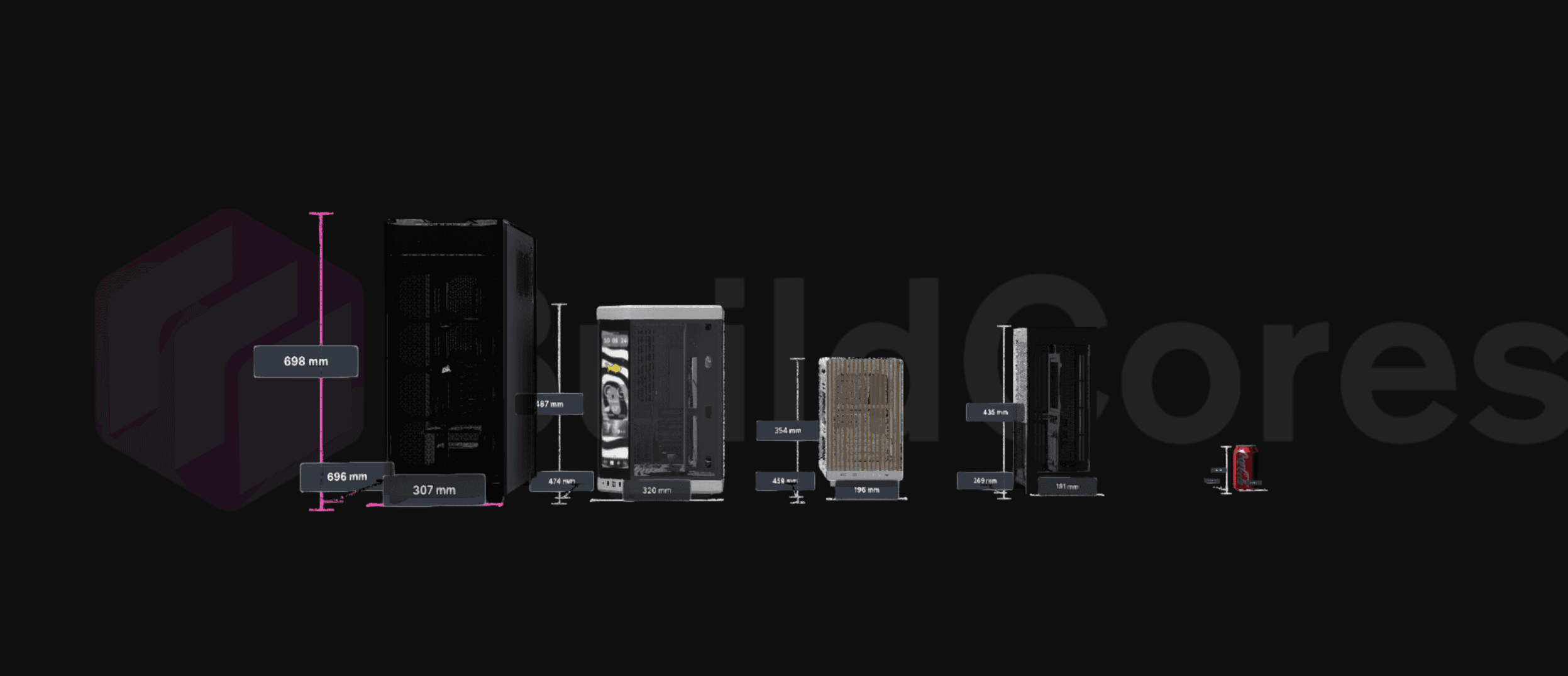
PC case size chart: SFF vs mid tower vs full tower
These are practical external-size ranges for common PC case classes. Always check the exact product dimensions before buying, because case names are not standardized across brands.
SFF / Mini-ITX
- Typical dimensions
- 200-380 mm H, 90-220 mm W, 200-380 mm D
- Typical volume
- 5-20 L
- Motherboard support
- Mini-ITX
- Best for
- Desk-friendly, living-room, portable, and minimalist builds.
- Fit checks
- Short GPU support, low-profile CPU cooler height, SFX PSU support, and airflow path.
Compact / Micro tower
- Typical dimensions
- 320-430 mm H, 170-230 mm W, 320-430 mm D
- Typical volume
- 20-35 L
- Motherboard support
- Mini-ITX or Micro-ATX
- Best for
- Smaller gaming builds that still need easier cable routing than SFF.
- Fit checks
- GPU length, front radiator support, CPU cooler height, and bottom intake clearance.
Mid tower
- Typical dimensions
- 430-520 mm H, 200-250 mm W, 400-520 mm D
- Typical volume
- 35-60 L
- Motherboard support
- ATX, Micro-ATX, Mini-ITX
- Best for
- Most gaming PCs, creator systems, and first-time builds.
- Fit checks
- Long GPU fit, tower cooler height, 240/280/360 mm radiator placement, and drive space.
Showcase / dual chamber
- Typical dimensions
- 420-550 mm H, 260-330 mm W, 400-550 mm D
- Typical volume
- 45-80 L
- Motherboard support
- ATX, Micro-ATX, Mini-ITX
- Best for
- Display builds, clean cable routing, large glass panels, and side-mounted radiators.
- Fit checks
- Extra width on the desk, side radiator clearance, cable chamber depth, and airflow restrictions.
Full tower
- Typical dimensions
- 520-700+ mm H, 230-300 mm W, 500-650+ mm D
- Typical volume
- 60-100+ L
- Motherboard support
- ATX, E-ATX, Micro-ATX, Mini-ITX
- Best for
- Custom loops, oversized GPUs, heavy storage, workstation boards, and maximum expansion.
- Fit checks
- Floor or desk footprint, weight, radiator layout, fan count, and cable reach.
Case dimensions to check before buying
A case can look large in photos and still fail the build if one clearance number is tight. Check these measurements side by side.
Height and desk clearance
Measure under-desk and shelf space first. Leave room above the case for top exhaust, radiator tubes, and easy access to ports.
Depth and cable room
Depth affects long GPUs, front radiators, and rear cable bends. Add extra space behind the case if it sits near a wall.
Width and cooler clearance
Wider cases usually support taller air coolers and easier cable management, but they also take more desk footprint.
GPU, radiator, and motherboard support
Compare maximum GPU length, CPU cooler height, radiator positions, motherboard form factor, PSU size, and included fan layout together.
PC case size comparison factors
A useful case comparison checks more than the largest number on the spec sheet. Compare volume, footprint, component clearance, radiator room, and motherboard support together.
Case dimensions in context
Compare supported cases by visual scale instead of reading length, width, height, and volume in separate spec tables.
Clearance planning
Use case size comparison as the first step before checking GPU length, CPU cooler height, radiator support, and fan layout.
Build-ready next step
Once the case size looks right, move into the full builder to check compatibility, pricing, and the complete parts list.
How to choose a PC case size
Use the size class to narrow your search, then verify the exact dimensions and clearance numbers for the models you are comparing.
Compare SFF, mid tower, and full tower scale
Small form factor cases save desk space, mid towers fit most gaming builds, and full towers trade footprint for clearance, airflow, and expansion room.
Check case size before clearance details
Case dimensions are only the starting point. Compare case size first, then verify GPU clearance, cooler clearance, radiator support, and fan support in the build flow.
Share the case comparison
Send a comparison link when you need another builder to review the same case size tradeoff before buying.
PC Case Size Comparison FAQ
How do I compare PC case sizes on BuildCores?
Open the PC case comparison page, add supported cases, and review their size and scale side by side in the 3D comparison view.
How big is a mid tower compared with a full tower?
A mid tower is usually around 430 to 520 mm tall and 35 to 60 liters, while a full tower is often 520 mm or taller and can exceed 60 liters. Exact dimensions vary by model.
What dimensions matter most when comparing PC cases?
Check height for desk clearance, width for CPU cooler and cable space, depth for GPU and radiator room, and total volume when comparing compact cases.
How many liters is a small form factor PC case?
Many SFF cases are roughly 5 to 20 liters. Very small cases usually require tighter GPU, CPU cooler, PSU, and airflow planning.
Can I use it for GPU clearance and CPU cooler clearance?
Use the case size comparison to narrow the chassis first, then check GPU length, cooler height, radiator support, and compatibility in the full BuildCores builder.
Is PC case size comparison useful for desk footprint?
Yes. A visual case comparison helps judge how compact, mid tower, full tower, and showcase cases will feel on or around a desk setup.
Explore more BuildCores features
The other feature pages cover nearby steps builders often check before they buy.
3D PC Part Comparison
Learn how to compare PC parts in 3D with side-by-side dimensions, specs, fit context, PC case size comparison, and supported comparison presets for GPUs, coolers, monitors, desks, and more.
ExplorePC Fan Simulator
Use BuildCores as a PC fan simulator to preview case airflow, fan direction, radiator placement, and cooling layout in a 3D PC build.
ExploreRGB Simulator
Preview RGB PC lighting in 3D with SignalRGB effects, custom colors, brightness controls, and lighting zones before buying parts.
ExplorePC Price Comparison
Compare PC part prices from multiple retailers, review regional availability, track price history, and keep build totals current in BuildCores.
ExploreSetup Builder
Plan a complete gaming setup with PC builds, desks, monitors, peripherals, and accessories using BuildCores and Setup Builder.
Explore